# Temperatures explained

### Yearly chart

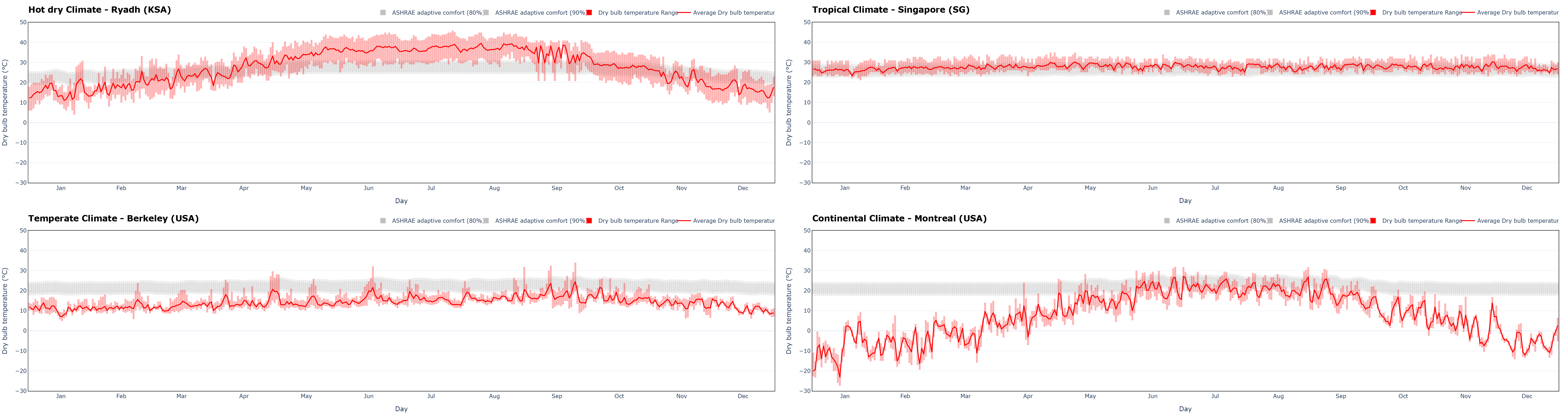
The annual graph allows the different months' [dry-bulb temperature ](https://en.wikipedia.org/wiki/Dry-bulb_temperature)ranges to be evaluated. Moreover, overlaying the average value trend for each day helps visualize the differences between the minimum and maximum daily values for the investigated location.

Comfortable temperature ranges for 80% and 90% of the population, calculated according to [ASHRAE adaptive comfort](https://en.wikipedia.org/wiki/Thermal_comfort#Adaptive_comfort_model), are overlaid (see also the excellent [CBE Thermal Comfort Tool](https://comfort.cbe.berkeley.edu/)). For each location, it is therefore possible to assess the temperature difference between outdoors and comfort conditions, or to evaluate passive [free cooling](https://en.wikipedia.org/wiki/Free_cooling) strategies using outside air in the summer season. For more information on [natural ventilation potential, see the dedicated page](https://cbe-berkeley.gitbook.io/clima/documentation/tabs-explained/natural-ventilation).

<figure><img src="https://491114279-files.gitbook.io/~/files/v0/b/gitbook-x-prod.appspot.com/o/spaces%2F-MhupA7DXRC4lRDTpJQJ%2Fuploads%2Fgit-blob-d64e057c8363e1d4469bc5203975935c513aed59%2FT%20yearly.png?alt=media" alt=""><figcaption><p>Annual dry bulb temperatures trend in four common climatic conditions: hot dry, tropical, temperate, and continental</p></figcaption></figure>

Building design must inevitably consider local climatic trends. Comparing the different annual trends in the previous image, keeping the comfort zone as a fixed reference point, it is very clear that we expect to find four aesthetically and functionally dramatically different buildings.

### Daily chart

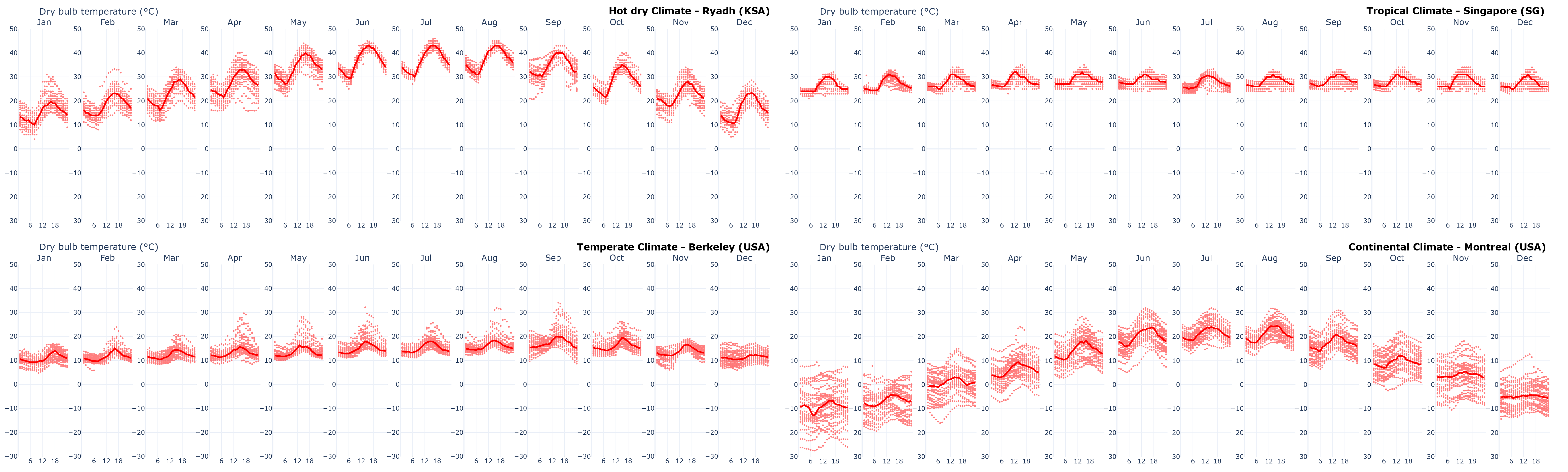
Monthly [scatterplots](https://en.wikipedia.org/wiki/Scatter_plot) show all hourly temperatures. The temperature excursion is much more evident than in the annual graphs. Daily medians, i.e., the most frequently occurring values, help evaluate the outliers.

<figure><img src="https://491114279-files.gitbook.io/~/files/v0/b/gitbook-x-prod.appspot.com/o/spaces%2F-MhupA7DXRC4lRDTpJQJ%2Fuploads%2Fgit-blob-739f9563ad04267502615ffbd39608f1a0e84d92%2FT%20daily.png?alt=media" alt=""><figcaption><p>Daily dry bulb temperatures trend in four common climatic conditions: hot dry, tropical, temperate, and continental</p></figcaption></figure>

Typical monthly days show what buildings must provide to create comfortable environments. Below is an example of a comparison between four drastically opposite climates

Overall, the first observation is the climatic variability of desert and continental climates, while the other two are mostly stable at constant levels.

More in detail, imaging that we might design a building, we start from the factual need to reduce incoming heat into the environment with solar shading or other passive solutions in desert climates, to the constant need to create air movement that gives a sense of coolness in the constant tropical climates; we get to the steady temperate climates where it is easier to recreate comfortable conditions, to the continental climates, which are highly variable from summer to winter and certainly more challenging to handle.

### Heatmap

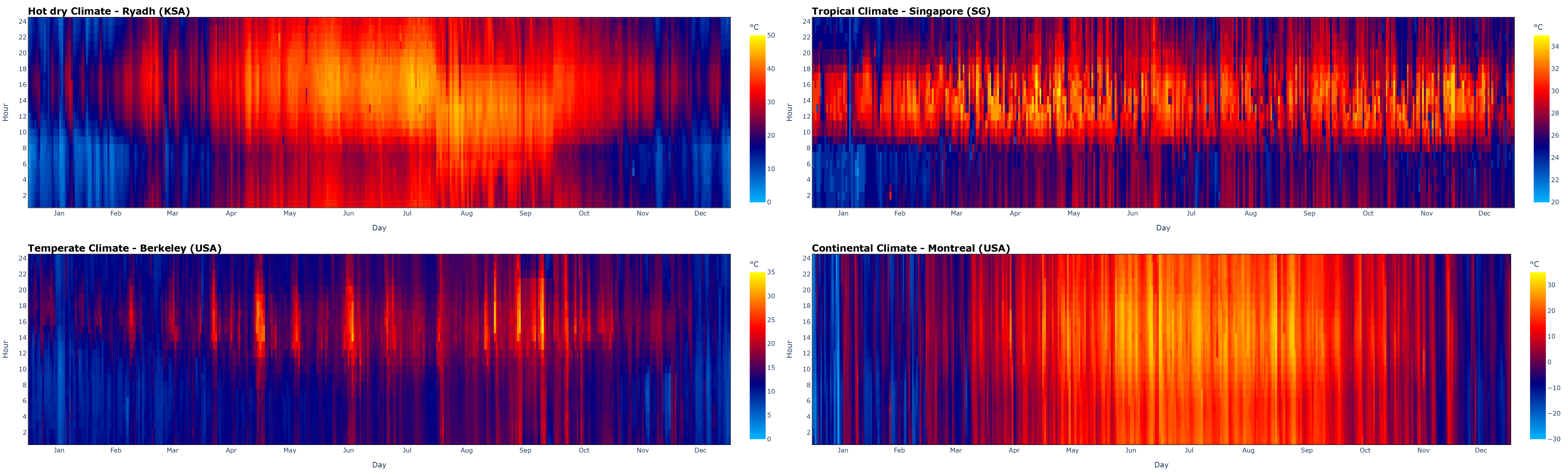
Heatmap is another useful method for evaluating thermal excursion over a year (by evaluating the horizontal gradient) or over individual days (by evaluating the vertical gradient).

<figure><img src="https://491114279-files.gitbook.io/~/files/v0/b/gitbook-x-prod.appspot.com/o/spaces%2F-MhupA7DXRC4lRDTpJQJ%2Fuploads%2Fgit-blob-ca0797261da6a20d75d951735dab177777879672%2FT%20Heatmap.png?alt=media" alt=""><figcaption><p>Daily dry bulb temperatures heatmap for four common climatic conditions: hot dry, tropical, temperate, and continental</p></figcaption></figure>

Albeit with different scales, the four heatmaps give a clear idea of the comparison of the four given climate types, especially for the temperature excursion between day and night.

* the desert climate, despite having a scale with a large delta T, shows clear contrasting vertical gradients, thus between day and night temperatures;
* the tropical climate has no variability throughout the year, with a nearly constant pattern. The same observation can be made for daily and nighttime temperatures;
* the temperate climate shows a certain constancy between day and night, but especially a slight increase over the summer month temperatures;
* the continental climate has a highly variable temperature scale, but despite this, there is a clear gradient between the winter and summer months. The difference between day and night is not clear but, as already evident in the daily graphs, the patterns are not regular and show a very variable climate.

### Descriptive statistics

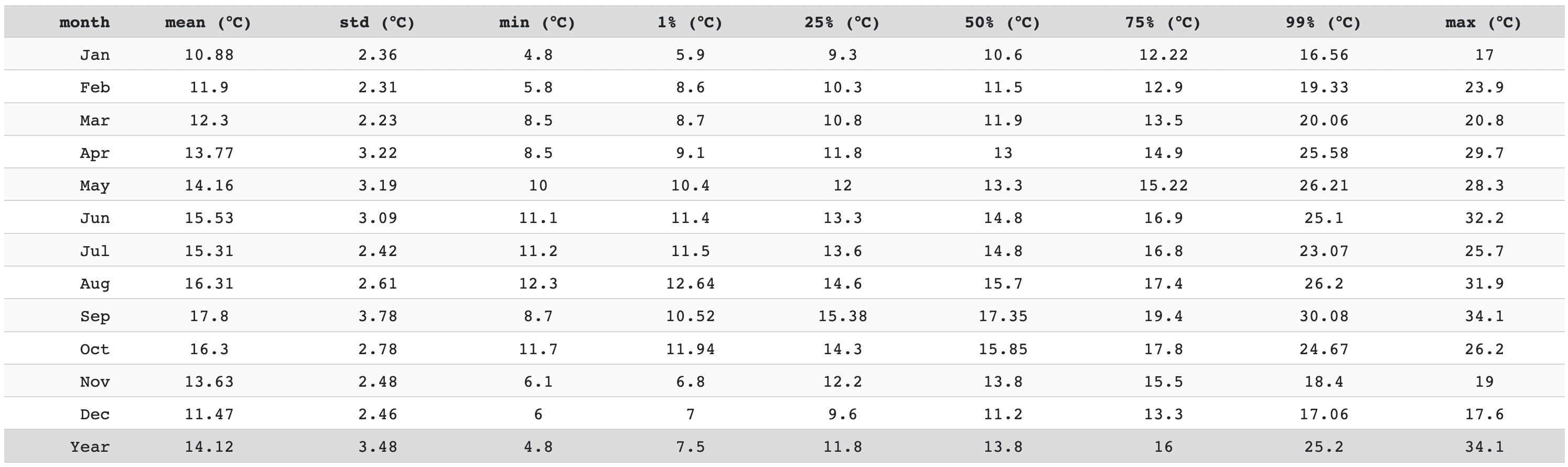
The last tool for temperature assessment is the statistics table. The earlier graphically made evaluations can be supported by the numbers. The following are listed, for each month:

* the temperature means;
* the [standard deviations](https://en.wikipedia.org/wiki/Standard_deviation);
* the minimum values;
* the [percentiles values](https://en.wikipedia.org/wiki/Percentile) (1%, 25%, 50%, 75%, 99%);
* the maximum values.

<figure><img src="https://491114279-files.gitbook.io/~/files/v0/b/gitbook-x-prod.appspot.com/o/spaces%2F-MhupA7DXRC4lRDTpJQJ%2Fuploads%2Fgit-blob-f60136353a42f5bdba5ea6b205359c4d52d40bdd%2FDesc%20stat%20T.png?alt=media" alt=""><figcaption><p>Descriptive statistics of dry bulb temperatures trend in a temperate climate, Berkeley (USA)</p></figcaption></figure>


---

# Agent Instructions: Querying This Documentation

If you need additional information that is not directly available in this page, you can query the documentation dynamically by asking a question.

Perform an HTTP GET request on the current page URL with the `ask` query parameter:

```
GET https://cbe-berkeley.gitbook.io/clima/documentation/tabs-explained/temperature-and-humidity/temperatures-explained.md?ask=<question>
```

The question should be specific, self-contained, and written in natural language.
The response will contain a direct answer to the question and relevant excerpts and sources from the documentation.

Use this mechanism when the answer is not explicitly present in the current page, you need clarification or additional context, or you want to retrieve related documentation sections.